Lights up the word you say
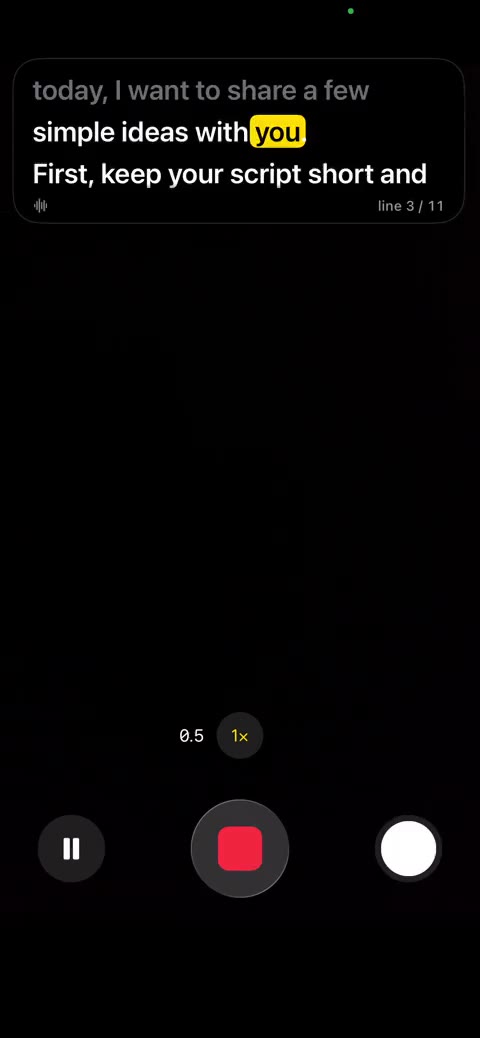
The script moves as you speak and lights up the word you are on, in the languages your iPhone recognises. In other languages it scrolls at the speed you set.
Voice teleprompter for creators
Your script floats over the Camera app and lights up each word as you say it. Made for creators who film themselves.

Coming soon
Type it, paste it or import a file.
Your script floats in a small window over the Camera app.
The word you are saying lights up and the script moves with you.
The script moves as you speak and lights up the word you are on, in the languages your iPhone recognises. In other languages it scrolls at the speed you set.
A small window stays on top of the Camera app while you record, close to the lens, so your eyes stay on the camera.
Pause, go back a line or skip ahead while Camera records: tap the back of your iPhone, or use the Control Center buttons.
Speech is recognised on your iPhone, and sent to Apple only for a language you allow. Your scripts stay on your iPhone. No account, no ads, no tracking.
7-day free trial
$4.99/month
Billed every month
Save 16%
$49.99/year
Billed once a year
After the trial the subscription renews automatically. Cancel anytime in your iPhone Settings, at least 24 hours before it renews.
Say it like you mean it.
Saygleam is coming soon to the App Store.